# LVM (Logical Volume Manager)
====================================================================================
LVM, or Logical Volume Manager, is a tool used on Linux systems to manage disk space in a more flexible way compared to traditional partitioning. It acts like a layer of abstraction between your physical disks and the logical volumes you use for your filesystems. Here's a breakdown of how it works:
**Components of LVM:**
- **Physical Volumes (PV):** These are your actual physical hard drives or partitions on those drives. They are the raw storage devices that LVM uses.
- **Volume Group (VG):** A VG is a collection of PVs that are grouped together under LVM management. You can think of it as a pool of storage space.
- **Logical Volume (LV):** This is the virtual partition that you create from the storage space in a VG. You can format an LV with a filesystem (like ext4) and use it to store your data just like a regular partition.
[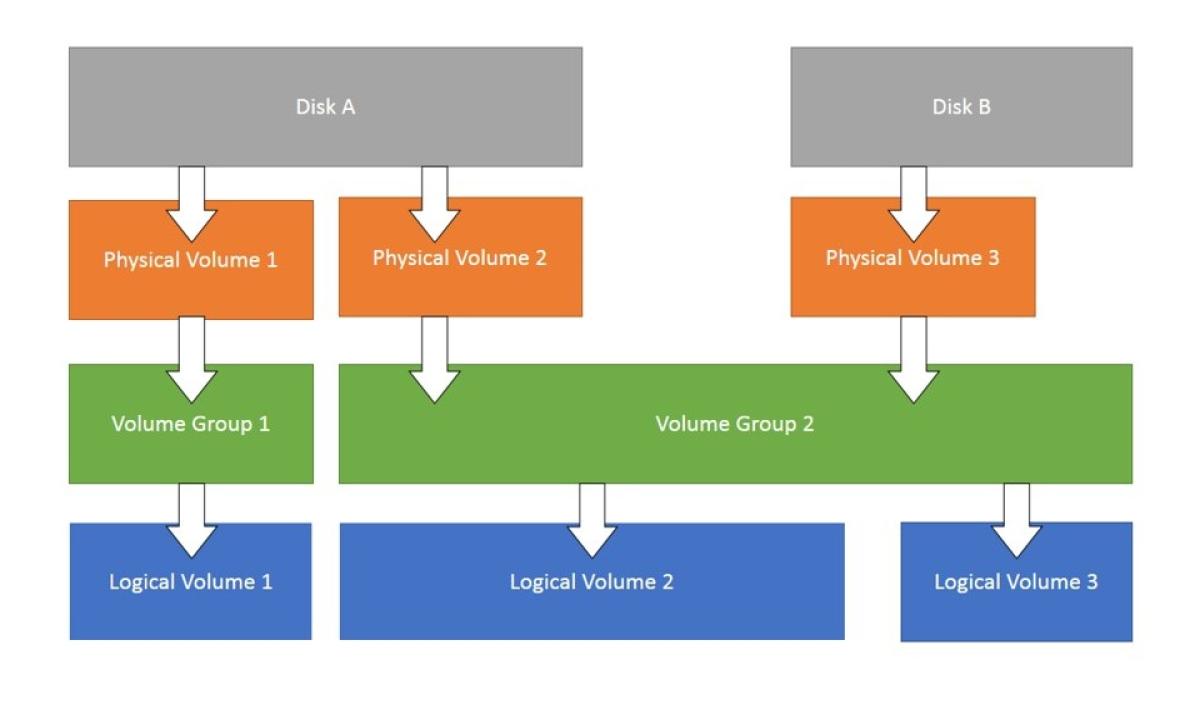](https://bookstack.b4sed.xyz/uploads/images/gallery/2024-05/lvm-cropped.jpg)
#### **Physical Volume (PV) Management:**
##### Initializes a physical disk or partition for use with LVM.
Replace `/dev/sdX` with the actual device name.
```
pvcreate /dev/sdX
```
##### Displays information about all the PVs in your system.
`pvdisplay`
##### Move extents (data chunks) from one PV to another.
This is useful for migrating data or rebalancing PVs within a VG.
```
pvmove /dev/sdX /dev/sdY
```
Resizes a physical disk or partition that's already a PV.
`pvresize /dev/sdX`
`pvremove /dev/sdX`: Removes a PV from LVM management.
**Volume Group (VG) Management:**
- `vgcreate vg_name /dev/sdX /dev/sdY`: Creates a new volume group named `vg_name` using the specified PVs (`/dev/sdX` and `/dev/sdY`). You can add more PVs to a VG later.
- `vgdisplay`: Displays information about all the VGs in your system.
- `vgreduce vg_name /dev/sdX`: Removes a PV from a volume group (assuming there are other PVs in the VG and the data is not exclusively on the PV being removed).
- `vgremove vg_name`: Removes a volume group entirely. This destroys the VG and all its LVs. Use with caution!
**Logical Volume (LV) Management:**
- `lvcreate -n lv_name -L vg_name`: Creates a new logical volume named `lv_name` with the specified size `` within the volume group `vg_name`. You can specify the size in various units (e.g., M for Megabytes, G for Gigabytes).
- `lvdisplay`: Displays information about all the LVs in your system.
- `lvextend -L /dev/mapper/vg_name-lv_name`: Extends the size of an existing LV. Replace `` with the desired expansion size.
- `lvreduce -L /dev/mapper/vg_name-lv_name`: Reduces the size of an existing LV. Use with caution as data loss might occur if shrinking beyond the size of the data written on the LV.
- `lvremove /dev/mapper/vg_name-lv_name`: Removes a logical volume from the VG. The space becomes available for other LVs within the VG.
- **lvresize \[OPTIONS\] LV \[PV ...\]**: Resizes an existing LV. This command was covered in detail previously.
**Information and Scanning:**
- `lvmconfig`: Displays global LVM configuration information.
- `vgscan`: Scans all disks for PVs. This updates LVM's internal information about available physical devices.
- `lvscan`: Scans all VGs for LVs. This updates LVM's information about logical volumes within existing VGs.