# Sandboxing & CHROOT
====================================================================================
#### CHROOT (Changed Root) Jail
CHROOT essentially means that a user or application has it's root changed, essentially locking it away from the rest of the server filesystem.
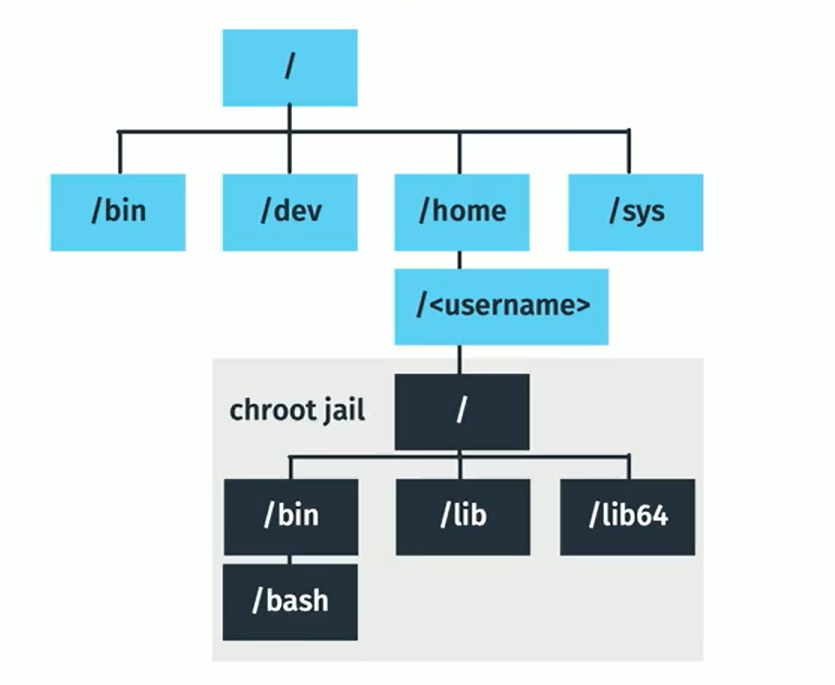
There are limitations to using a CHROOT Jail, an example being that applications that are chrooted are unable to communicate with each other.
====================================================================================
#### Sandboxing
Sandboxing essentially means that an application and its dependencies are 'wrapped' together. This is useful if you have 2 packages that share a dependency, but require different versions of that dependency.
------------------------------------------------------------------------------------------------------------------------------------------
#### Debian Based Systems
Debian-based systems will typically have the snap application installed, this can be used for sandboxing software.
##### list applications installed through snap
```
snap list
```
##### Install an application
```
snap install packagename
```
When you install an application through snap, you'll see that a 'loopback' storage device is added (you can see this by running the lsblk command). The reason for this is that the application is stored on it's own virtual storage device, so as to not interfere with versions installed elsewhere across the system, for example:
```
$ lsblk
NAME MAJ:MIN RM SIZE RO TYPE MOUNTPOINT
loop0 7:0 0 14.5M 1 loop /snap/gnome-logs/37
loop1 7:1 0 2.3M 1 loop /snap/gnome-calculator/170
loop2 7:2 0 86.6M 1 loop /snap/core/4486
loop3 7:3 0 86.6M 1 loop /snap/core/4650
loop4 7:4 0 1.6M 1 loop /snap/gnome-calculator/154
loop5 7:5 0 14.5M 1 loop /snap/gnome-logs/34
loop6 7:6 0 3.3M 1 loop /snap/gnome-system-monitor/36
loop7 7:7 0 2.3M 1 loop /snap/gnome-calculator/178
loop8 7:8 0 13M 1 loop /snap/gnome-characters/101
loop9 7:9 0 3.7M 1 loop /snap/gnome-system-monitor/45
loop10 7:10 0 139.5M 1 loop /snap/gnome-3-26-1604/64
loop11 7:11 0 140M 1 loop /snap/gnome-3-26-1604/59
loop12 7:12 0 3.7M 1 loop /snap/gnome-system-monitor/41
loop13 7:13 0 21M 1 loop /snap/gnome-logs/25
loop14 7:14 0 12.2M 1 loop /snap/gnome-characters/69
loop15 7:15 0 13M 1 loop /snap/gnome-characters/96
sda 8:0 0 298.1G 0 disk
├─sda1 8:1 0 512M 0 part /boot/efi
└─sda2 8:2 0 297.6G 0 part /
sr0 11:0 1 1024M 0 rom
```
##### Remove applications
```
snap remove packagename
```
------------------------------------------------------------------------------------------------------------------------------------------
Alternative sandbox package managers include:
[Flatpak](https://www.flatpak.org/)
====================================================================================