My Solution
notes regarding my personal server solution, feel free to have a look
Overview
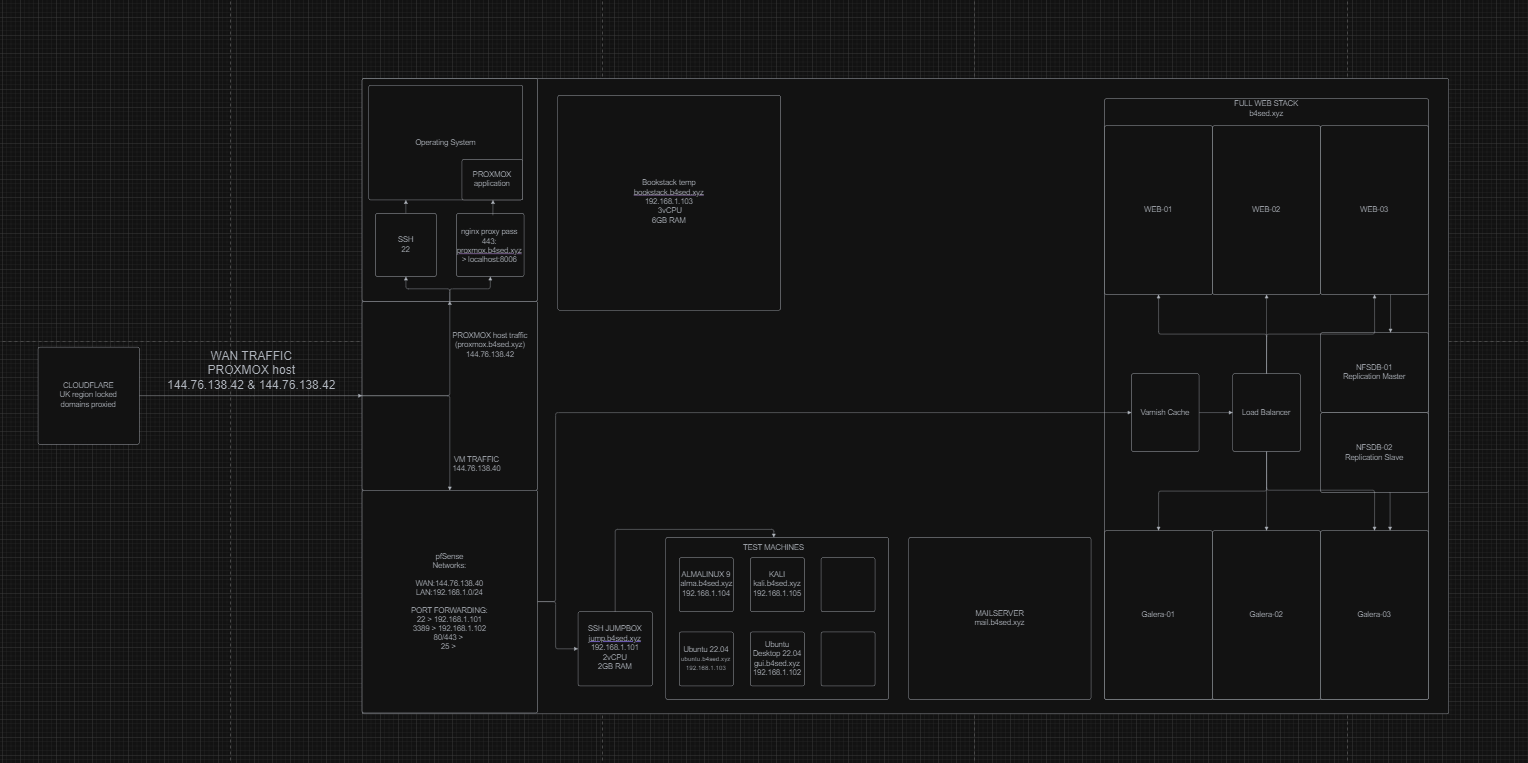
Proxmox
Installing & launching a PROXMOX server
=================================================================================
Installation
PROXMOX ISO download:
https://www.proxmox.com/en/downloads/proxmox-virtual-environment/iso
Network Configuration
PfSense
Networking for my VMs is done through pfSense, which is basically an router/firewall OS installed onto a VM, and configured to pass network traffic from the WAN network (144.76.138.40) to the LAN network (192.168.1.1/24) via a network bridge.
For more information on my PfSense configuration, see here.
pfSense
Self Hosted
Flame
Flame is essentially just a web dashboard for accessing your other self hosted apps.
Installation
https://github.com/pawelmalak/flame/wiki/Installation-without-Docker#prerequisites
BookStack
Bookstack is a self-hosted notes platform that you're currently using to read this.
Installation
https://jardin.icamole.site/books/bookstack/page/installation
Backup and restore process
https://www.bookstackapp.com/docs/admin/backup-restore/
Side note on the restore process - I opted to use this method for migrating my existing bookstack configuration for Hetzner Cloud to Hetzner Bare-Metal. While the migration process itself wasn't too difficult, I did run into a few issues - most likely because I was also migrating from docker to none-docker. TLDR; you may have to manually create some of the MySQL table colums.
Firefly 3
Firefly 3 is a self hosted finance tracking application.
Planka
Planka is a self hosted 'to-do-list' application.
Authelia
Authelia is a 2FA application that I use for protecting access to my web apps.
Backups
Off-Site Backups
Local Backups
Local backups are performed via cronjobs configured on a per server basis, depending on the files & databases required.
BookStack Backups
Database backups are performed using the mysqldump command, and using a dedicated 'backup' mysql user, with read only privilege:
##CREATE MySQL Backups User##
CREATE USER 'backup'@'localhost' IDENTIFIED BY 'password';

##GRANT Privilege to Backup User##
GRANT SELECT ON *.* TO 'backup'@'localhost';

##pull in update mysql user privilege
flush privileges;

##Give MySQL default mysqldump user options##
vim /root/.my.cnf
[mysqldump]
user=bookstack
password=password

##restart mysql##
systmctl restart mysql

##Cronjob for backups to run##
crontab -e
0 23 * * * DATE=`date +%y-%m-%d`; mysqldump -u backup bookstack --no-tablespaces | gzip > /bookstack-backups/database/bookstack-$DATE.sql.gz | rsync -a /bookstack-backups/database/bookstack-$DATE.sql.gz root@backup.b4sed.xyz:/backups/bookstack/database | find /bookstack-backups/database -name "*.gz" -type f -mtime +7 -delete
File level backups are performed using the tar command, the zipped file is then transferred to the remote backup server via rsync:
DATE=`date +%y-%m-%d`;tar -aP -cf /bookstack-backups/file/bookstack_file-$DATE.gz /var/www/BookStack |rsync -a /bookstack-backups/file/bookstack_file-$DATE.gz root@backup.b4sed.xyz:/backups/bookstack/file | find /bookstack-backups/file -name "*.gz" -type f -mtime +7 -deleteBookstack Web Solution
The solution used for hosting this site.
MySQL Replication
DB Cluster
NEW
Update Procedure
OS Maintenance
Core Pi
sudo apt update
sudo apt full-upgrade -y
sudo apt autoremove --purge -y
sudo rebootHome Pi
sudo apt update
sudo apt full-upgrade -y
sudo apt autoremove --purge -y
sudo reboot