
Linux Boot Process
The below image outlines the typical flow of a Linux system boot.
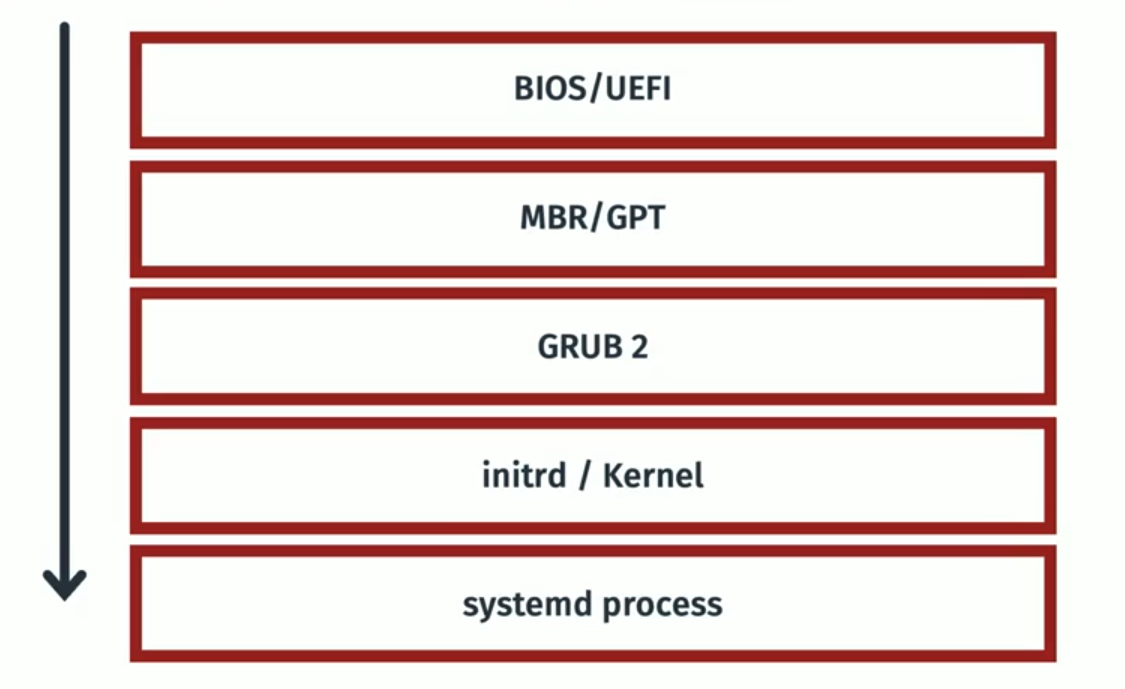
1. BIOS (Basic Input/Output System) / UEFI (Unified Extensible Firmware Interface)
When the system powers on, BIOS or UEFI is the first code that runs. BIOS/UEFI are responsible for checking and initialising the detected hardware, and identifying a disk to boot from (can be changed via boot order)
Key Functions:
-
Performs POST (Power-On Self Test) to check hardware
-
Initializes hardware components (CPU, RAM, disks, etc.)
-
Finds a bootable device based on boot order
-
Loads the bootloader (like GRUB2) from:
-
The MBR on BIOS systems
-
The EFI System Partition (ESP) on UEFI systems
-
Once the bootloader is found, BIOS/UEFI hands control over to it to continue the boot process.
MBR (Master Boot Record)
MBR is a disk configuration where a small section at the beginning of a disk (first 512 bytes) is used for storing bootloader code and the partition table. MBR is typically only used on BIOS systems.
ESP (EFI System Partition)
ESP is a FAT-32 formatted partition on GPT disks that is used for storing bootloader files and other boot files. During boot, UEFI reads from this partition to boot the OS.
2. GRUB2 (Grand Unified Boot Loader)
GRUB2 is a software program, specifically a bootloader. Its primary function is to take control during the computer startup process after the firmware (BIOS or UEFI) has initialized the hardware. Here's a breakdown of its role:
- GRUB2 will present the 'boot menu' to the user - this can be used for changing OS, entering rescue mode, etc.
- GRUB2 finds the linux kernel image and initramfs/initrd
- GRUB2 configures kernel parameteres
3. Kernel & initramfs/initrd
Once GRUB2 has loaded the kernel and initramfs/initrd into memory, the kernel then continues the boot process.
What is initrd?
-
initrd (initial RAM disk) is a temporary filesystem loaded into memory during the early boot stage.
-
It contains essential drivers and scripts needed to initialize hardware and mount the real root filesystem.
-
It helps the kernel boot successfully when the root filesystem requires special drivers (e.g., RAID, LVM, encryption).
-
Once the real root filesystem is mounted, the initrd is discarded.
What is a Linux Kernel?
-
The Linux kernel is the core component of the operating system.
-
It manages hardware resources, handles system calls, and provides essential services for all other software.
-
The kernel is responsible for managing CPU, memory, device drivers, and system security.
4. Systemd
Systemd is the first process that starts on a booting OS. Systemd is a foundational software suite for Linux operating systems. It acts as a system and service manager, handling tasks like booting up the system and managing services that run in the background.
No Comments