
SSH Configuration
====================================================================================
What is SSH?
SSH, or Secure Shell, is a cryptographic network protocol used for secure communication over an unsecured network. It is widely used to manage and access remote servers securely. SSH provides strong authentication and encrypted data communications between two computers, which helps protect against eavesdropping, connection hijacking, and other types of attacks.
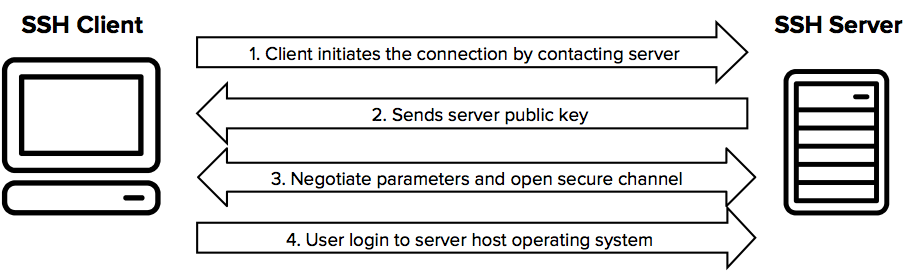
SSH Connection Process
-
Client Initiates Connection:
The client initiates an SSH connection to the SSH server by sending a connection request. -
Server Responds with Public Key:
- The server responds with its public key (and often a host key, which is used to uniquely identify the server and can be used to verify the server's identity).
Client Verifies Server Identity:
Key Exchange:
Session Key Generation:
Client Authentication:
- Password Authentication: The client sends a password over the encrypted connection.
- Public Key Authentication: The client generates an SSH key pair (public and private keys) before the connection. The public key is stored on the server in the
~/.ssh/authorized_keysfile. During the authentication process, the client proves possession of the corresponding private key by using it to sign a challenge provided by the server.
Secure Communication:
-----------------------------------------------------------------------------------------------------------------------------------------------
SSH Configuration
When it comes to SSH configuration, we're either talking about the SSH client, or the SSH server. (Ttypically both are installed on Linux Systems)
The configuration for the SSH server is located in /etc/ssh/sshd_config
The configuration for the SSH client is located in /etc/ssh/ssh_config
SSH Server Configuration Options
NOTE: Any changes made to the sshd_config won't be applied to your session until you reconnect (and restart SSHD).
These are all options that can be added to the SSH server (sshd_config) configuration file.
| Port 22 | Specify port for SSH server to listen on. |
| Listen Address IP_IP_IP_IP | Change the IP that the SSH server listens on |
| PasswordAuthentication yes | Enable password authentication |
-----------------------------------------------------------------------------------------------------------------------------------------------
Known Hosts
known_hosts is a file kept in the home directory of a user. This file contains the fingerprint key of each SSH-server that a connection has been made to. This is a security feature within SSH as it allows for host fingerprint keys (unique) to be validated before the connection is established.
~/.ssh/known_hosts-----------------------------------------------------------------------------------------------------------------------------------------------
Authentication Methods