
SSH Configuration
What is SSH?
SSH, or Secure Shell, is a cryptographic network protocol used for secure communication over an unsecured network. It is widely used to manage and access remote servers securely. SSH provides strong authentication and encrypted data communications between two computers, which helps protect against eavesdropping, connection hijacking, and other types of attacks.
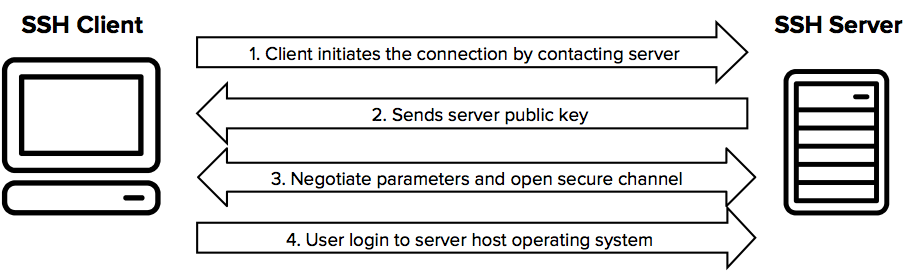
SSH Connection Process
-
Client Initiates Connection:
The client initiates an SSH connection to the SSH server by sending a connection request. -
Server Responds with Public Key:
The server responds with its public key (and often a host key, which is used to uniquely identify the server and can be used to verify the server's identity). -
Client Verifies Server Identity:
The client verifies the server's public key against a local list of known hosts to ensure it is connecting to the correct server. If the server's key is not in the known hosts file, the user is usually prompted to accept the new key. -
Key Exchange:
The client and server perform a key exchange to securely generate a shared secret key. This key exchange process does not involve the client generating a private key. Instead, they use the server's public key to negotiate a shared secret (symmetric key) through an algorithm such as Diffie-Hellman. Both the client and server use their own private keys (already generated and stored) for this purpose. -
Session Key Generation:
The shared secret generated during the key exchange is used to create session keys, which are symmetric keys for encrypting the data transferred during the session. Both the client and the server now have the same session keys. -
Client Authentication:
The client authenticates itself to the server. This can be done using various methods:-
- Password Authentication: The client sends a password over the encrypted connection.
- Public Key Authentication: The client generates an SSH key pair (public and private keys) before the connection. The public key is stored on the server in the
~/.ssh/authorized_keysfile. During the authentication process, the client proves possession of the corresponding private key by using it to sign a challenge provided by the server.
-
-
Secure Communication:
After successful authentication, the client and server use the session keys to encrypt and decrypt the data transferred between them, ensuring secure communication.
SSH Configuration
When it comes to SSH configuration, we're either talking about the SSH client, or the SSH server. (Ttypically both are installed on Linux Systems)
The configuration for the SSH server is located in /etc/ssh/sshd_config
The configuration for the SSH client is located in /etc/ssh/ssh_config
SSH Server Configuration Options
NOTE: Any changes made to the sshd_config won't be applied to your session until you reconnect (and restart SSHD).
NOTE: You can use the command sshd -T to view the current SSH server setup - also lists ciphers!
These are all options that can be added to the SSH server (sshd_config) configuration file.
| Port 22 | Specify port for SSH server to listen on. |
| Listen Address IP_IP_IP_IP | Change the IP that the SSH server listens on |
| PasswordAuthentication yes | Enable password authentication |
| PubkeyAuthentication yes |
Enable key authentication |
| Match User ukfastsupport PasswordAuthentication yes AuthenticationMethods password |
A match user block is where specific rules can be set for a specified user. |
| Match Address 10.0.0.5,10.0.0.11 PermitRootLogin yes AuthenticationMethods publickey PasswordAuthentication no |
Similarly to 'match user', we can also create rules based on the connecting address. |
| PermitRootLogin no |
allow direct logins to the root user (or not) |
| Protocol 2 |
Disable SSH1 (old and shouldn't really be used) |
| ClientAliveInterval 300 |
Idle timeout for connections |
| ClientAliveCountMax 2 |
Max number of 'alive' messages sent before a user is disconnected |
| X11Forwarding no |
Disable graphical environments over SSH |
|
|
Known Hosts
known_hosts is a file kept in the home directory of a user. This file contains the fingerprint key of each SSH-server that a connection has been made to. This is a security feature within SSH as it allows for host fingerprint keys (unique) to be validated before the connection is established.
~/.ssh/known_hostsSSH Keys
SSH keys are a pair of cryptographic keys used in SSH (Secure Shell) protocol to authenticate a user and establish a secure communication channel between the client and server. The SSH key pair consists of a private key and a public key.
For key-based authentication to work, you'll need to ensure that key authentication is enabled in your SSHD configuration.
SSH key pairs are user-specific, and are stored by default in the home directory as:
private key: ~/.ssh/id_rsa
public key: ~/.ssh/id_rsa.pub
Generate an SSH key pair
ssh-keygenSharing SSH keys
The ssh-copy-id command is used to install your public SSH key on the remote server, allowing you to log in to that server without needing to enter a password each time.
ssh-copy-id user@remoteserverViewing stored keys
Keys that have been stored for a user can be viewed within ~/.ssh/authorized_keys
SSH Certificates
"SSH certificates are a method of managing SSH keys that involves issuing signed certificates from a Certificate Authority (CA). These certificates contain a user's public key, identity information, and access permissions. They enhance security and simplify management compared to traditional SSH key pairs."
ssh-keygen -q -N "" -t rsa -b 4096 -f /etc/ssh/ssh_host_rsa_keyAlgorithms
SSH's support algorithms can be defined within the SSHD configuration file.
No Comments