
File Permissions & Ownership
====================================================================================
Linux File Permissions
Every file in Linux has permissions, these define which actions can be undertaken by the user,group, and other.
As seen on the file below, permissions are set at the start of the line using 10 characters.
-r--r-xrw- 1 root root 27 May 26 10:56 test.txtThese 10 characters are the permission classes, and are used as follows:
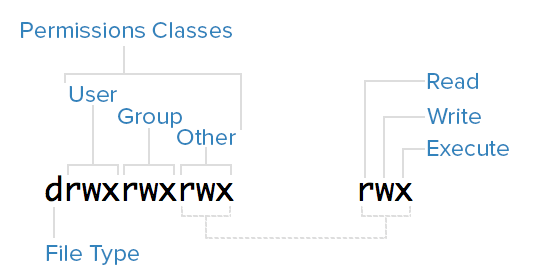
(For file type: - is a file, d is a directory).
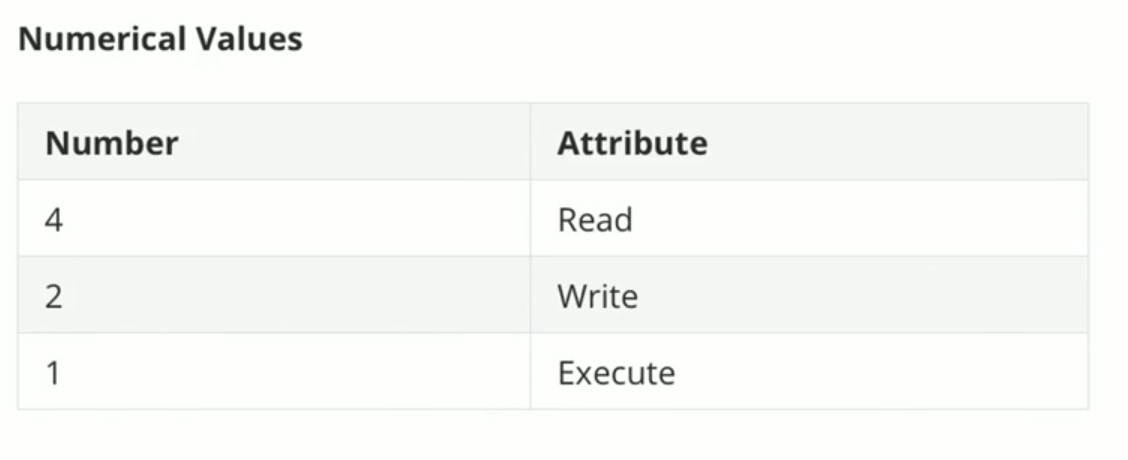
Permissions can also be represented in number format.
------------------------------------------------------------------------------------------------------------------------------------------------
Changing file or directory permissions
(Numerical representation)
chmod 777 filename (Letter representation)
chmod u=rwx,g=rwx,o=rYou can also use -R to chmod recursively:
chmod -R 777 directoryname====================================================================================
Linux File Ownership
Files in Linux are owned by a user and group.
-rw-r--r-- 1 root root 27 May 26 10:56 test.txtChanging user/group
chown newuser:newgroupFor instances where you want to chown a directory, and all of the subdirectories & files within, we can use the -R (recursive) flag:
chown -R newuser:newgroup directoryname ====================================================================================
FACL - File Access Control List
File Access Control Lists (FACLs) provide a robust mechanism for managing file permissions in Linux, offering greater flexibility and control than traditional Unix permissions. By using commands like setfacl and getfacl, administrators can easily set and view ACLs to fine-tune access to files and directories for multiple users and groups.
View file/directory ACL
getfacl filenameGrant an additional user permissions on a file
setfacl -m u:username:rwx filenameRemove a user's permissions on a file
setfacl -x u:username filenameDefine default ownership/permissions for directories
setfacl -m d:u:username:rwx filename ====================================================================================
Sticky bits
In Linux, the sticky bit is a special permission that can be set on directories to control user access to the files within those directories. When the sticky bit is set on a directory, it restricts the deletion or renaming of files within that directory. Specifically, only the file's owner, the directory's owner, or the root user can delete or rename files.
Enable sticky bits
chmod o+t directorynameDisable sticky bits
chmod o-t directoryname====================================================================================