
Pods, Replicas, Deployments
How YAML is Used in Kubernetes:
YAML files are used to define Kubernetes objects such as pods, deployments, services, config maps, secrets, and many others. These objects describe the desired state of your application or infrastructure, and Kubernetes works to maintain that state.
It's recommended to indent using 2 spaces in YAML, rather than tabbing
API Version & Kind
The apiVersion in a Kubernetes YAML file specifies which version of the Kubernetes API to use for the object being defined. Different Kubernetes objects (e.g., Pods, Deployments) belong to different API groups, and each group has versioned releases to manage features and compatibility.
| v1 | Core objects like Pods, Services, ConfigMaps, PersistentVolumes, and Secrets. |
| apps/v1 | Workloads such as Deployments, StatefulSets, DaemonSets, and ReplicaSets. |
Check the required API Version for a kubernetes object:
kubectl api-resources | grep objectnameIn addition to the apiVersion option, YAML files also require that the 'kind' parameter be set. The kind field in a YAML file specifies the type of Kubernetes resource you're defining.
| apiVersion | Available kind options |
| v1 | Pod, Service, ConfigMap, Secret, Persistent Volume, PersistentVolumeClaim, Namespace, ServiceAccount, Endpoint, LimitRange, ResourceQuota, Binding, Event, ReplicationController, PodTemplate |
| apps/v1 |
Defining apiVersion and kind
At the beginning of any K8S YAML file, you'll need to define both the apiVersion and kind parameters.
apiVersion: v1
kind: Pod
POD Definition
A pod definition file is used in Kubernetes to outline the pods and configuration involved in a deployment. Key configuration aspects to be defined within the pod definition file are:
| Metadata | Define pod name, labels, and annotations for identification. |
| Containers | Specify the container's name, image, and pull policy. |
| Resource Allocation |
|
| Ports |
|
| Environment Variables |
Pass environment variables to the container. |
| Volume Mounts | Mount persistent volumes or config files to the container. |
| Volumes | Define storage (PersistentVolumeClaim, ConfigMap, or Secret). |
| Probes | Health checks using liveness and readiness probes. |
| Command/Args | Custom commands and arguments for container startup. |
| Affinity/Anti-Affinity | Rules for scheduling the pod on specific nodes. |
| Node Selector | Simple label-based node constraints for scheduling. |
| Security Context | Set user/group IDs, filesystem permissions, and privilege levels. |
| DNS Policy |
|
| Restart Policy |
|
A pod definition file is great for outlining the spec of a pod & it's containers, but it only allows for a single pod to be defined (can still define multiple containers within that pod).
For defining pod replicas, see HERE
Create pods based on pod definition file:
kubectl create -f pod-definition.yamlApply new changes to existing pods:
kubectl apply -f pod-definition.yamlExample pod definition file
apiVersion: #v1 API version defined
kind: Pod #kind defined as pod
metadata: #begin metadata definitions
  name: nginx-pod
  labels:
    app: webapp
spec: #Begin pod specification
  containers: #Pod containers
  - name: nginx #Container name
    image: nginx:latest #Container image
    ports: #Port configuration
    - containerPort: 80
Replication Controller & Replica Sets
In Kubernetes, ReplicaSet and ReplicationController are both mechanisms used to ensure that a specified number of pod replicas are running at any given time. However, they have some differences, and the ReplicaSet has essentially replaced the older ReplicationController.
ReplicaSet
A ReplicaSet is a more modern Kubernetes resource that also ensures a specified number of pod replicas are running, similar to the ReplicationController. The key improvement is that a ReplicaSet supports set-based selectors, allowing for more complex filtering when managing pods. ReplicaSets are typically used in conjunction with Deployments, which add features like rolling updates and rollback capabilities. ReplicaSets have largely replaced ReplicationControllers in modern Kubernetes setups.
Replication Controller uses apiVersion: apps/v1.
Selector
The selector in a ReplicaSet is a mechanism that defines which pods the ReplicaSet is responsible for managing. It does this by matching labels that are assigned to pods. This ensures that only the pods with labels matching the selector will be controlled and monitored by the ReplicaSet.
In short, the Selector allows for the RS file to be applied to pods that aren't specifically defined in the file, through the use of tags.
example;
- Pod 1 has a label
app: frontend - Pod 2 has a label
app: backend - Your ReplicaSet has a selector that looks for pods with the label
app: frontend.
This means the ReplicaSet will only control Pod 1 because it has the matching label app: frontend. It won’t touch Pod 2 because it has the app: backend label, which doesn't match.
apiVersion: apps/v1
kind: ReplicaSet

metadata:
  name: app-rs
  labels:
    app: webapp

spec:
  template:
    metadata:
      name: app-rc
      labels:
        app: webapp
        type: prod # label type: prod set
    spec:
      containers:
        - name: nginx
          image: nginx:latest
          ports:
            - containerPort: 80

  replicas: 4 #4 replicas specified
  selector: #Selector initiated
    matchLabels: #Set to match based on label value
      type: prod #Label value = type: prod
Create pods based on RS YAML file
kubectl create -f rs-file.ymlApply changes to existing replicaset
kubectl apply -f rs-file.ymlView Replica Set status
kubectl get replicaset replicasetnameDelete Replica Set (and underlying pods)
kubectl delete replicaset replicasetnameReplica Set Scaling
Let's say that you want to change the number of replica pods for an existing deployment; there are 2 main methods to achieve this:
Changing ReplicaSet scale
Let's say that you want to change the number of replica pods; there are 2 main methods to achieve this;
- Persistent change
To implement a persistent change to the replica set's number of replicas, you can update the 'replicas' value within the rs.yml file, and then apply changes:
kubectl apply -f rs.yml - Temp change
To implement a none-persistent (temporary) change to the replica set's number of replicas, you can use the kubectl scale command:
kubectl scale --replicas=8 replicaset replicasetnameexample;
kubectl scale --replicas=8 replicaset app-rsThis change won't persist; new deployments based on rs.yml file that still contains original replicas value, cluster restarts/ control plane reboots.
2.1 kubectl edit
You can use the kubectl edit command to edit the live (in memory) version of the YAML file that K8S has stored, this again isn't a persistent change.kubectl edit replicaset replicasetname
Replication Controller
replicationcontroller is the older version of replication in K8S, and should be avoided in favour of replica sets where possible.
Replication Controller uses apiVersion: v1.
The Replication Controller YAML file configuration is essentially the same as a pod definition file, in fact I nested the pod definition file mentioned here into this rc file. The only real difference is that the kind value was set as 'ReplicationController', a metadata list was created for the replicationcontroller itself, and the number of replicas is specified.
apiVersion: v1 #v1 API version defined
kind: ReplicationController

metadata:
  name: app-rc
  labels:
    app: webapp

spec: #Begin rc specification
  replicas: 3 # Number of pod replicas
  selector:
    app: webapp
  template:
    metadata:
      name: app-rc
      labels:
        app: webapp
    spec: # The pod spec
      containers: #Pod containers
        - name: nginx #Container name
          image: nginx:latest #Container image
          ports: #Port configuration
            - containerPort: 80 # Expose port 80
Create pods based on RC YAML file
kubectl create -f rc-file.ymlApply changes to existing pods
kubectl apply -f rc-file.ymlView replication controller status
kubectl get replicationcontrollerDeployments
A Deployment in Kubernetes is a higher-level abstraction used to manage and automate the lifecycle of ReplicaSets and pods. It provides features such as:
- Rolling Updates: Automatically updates pods to a new version without downtime.
- Rollback: Reverts to a previous version if something goes wrong during an update.
- Scaling: Automatically adjusts the number of replicas.
- Self-healing: Ensures the desired state is maintained by restarting failed pods.
Deployment uses apiVersion: apps/v1.
As you can see here, we have the previous pod definition, and replica set files nested within the deployments file.
apiVersion: apps/v1
kind: Deployment
metadata:
  name: my-deployment
  labels:
    tier: front-end
    app: nginx

spec:
  template:
    metadata:
      name: app-rc
      labels:
        app: webapp
        type: prod # label type: prod set
    spec:
      containers:
        - name: nginx
          image: nginx:latest
          ports:
            - containerPort: 80
  replicas: 4
  selector:
    matchLabels:
      type: prod
Show existing deployments
kubectl get deploymentsRollout
In Kubernetes, a rollout refers to the process of deploying a new version of an application (or updating an existing version) in a controlled, step-by-step manner to avoid downtime and minimize disruptions. Rollouts are primarily managed by Deployments, which control the creation and updates of ReplicaSets and their associated pods.
Update Strategies
There are various rollout strategies, with the default being 'rolling update'
RollingUpdate (Default)
A rolling update is the default deployment strategy in Kubernetes. It replaces pods with the old version of an application gradually with new pods running the updated version. This helps ensure that the application remains available during the update. If the deployment runs into errors with the new pods - ie they don't start, then the deployment will be paused until it's able to start the pods, ensuring that the application remains up.
A rolling update essentially creates a new replica set, starts scaling down the original replicaset, and scaling up the new one.
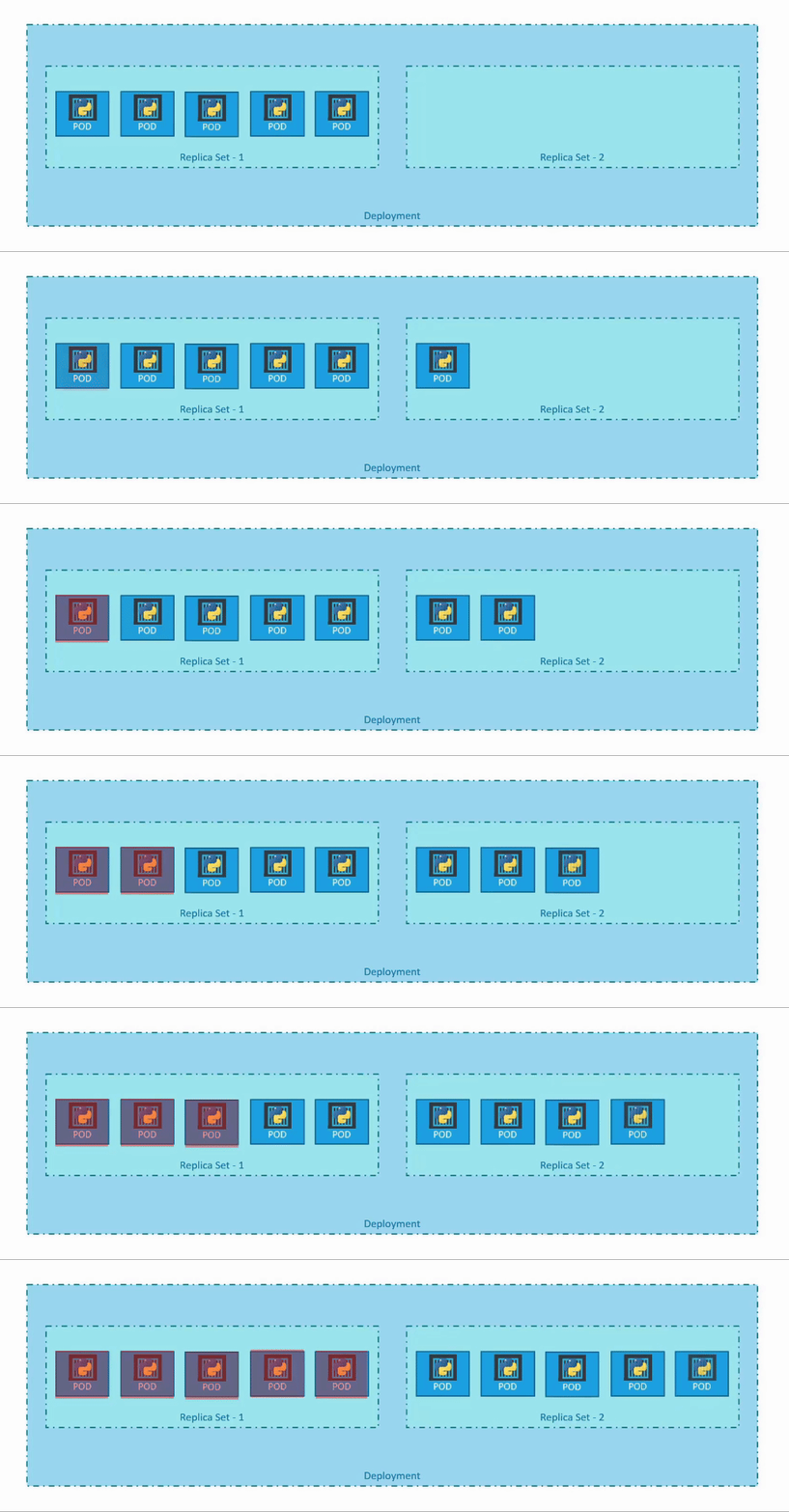
RollingUpdate YAML definition
strategy:
  type: RollingUpdate
  rollingUpdate:
    maxUnavailable: 1  # Number of pods that can be unavailable at once
    maxSurge: 1        # Number of extra pods that can be created temporarily
example;
apiVersion: apps/v1
kind: Deployment
metadata:
  name: my-deployment
  labels:
    tier: front-end
    app: nginx

spec:
  replicas: 4
  selector:
    matchLabels:
      type: prod
  strategy:
    type: RollingUpdate
    rollingUpdate:
      maxUnavailable: 1  # Number of pods that can be unavailable at once
      maxSurge: 1        # Number of extra pods that can be created temporarily
  template:
    metadata:
      name: app-rc
      labels:
        app: webapp
        type: prod # label type: prod set
    spec:
      containers:
        - name: nginx
          image: nginx:latest
          ports:
            - containerPort: 80
Recreate
Recreate strategy terminates all the existing pods before creating new ones. This means that during the update, no pods are available to serve traffic, causing potential downtime.
Recreate YAML definition
strategy:
  type: Recreate
example;
apiVersion: apps/v1
kind: Deployment
metadata:
  name: my-deployment
  labels:
    tier: front-end
    app: nginx

spec:
  replicas: 4
  selector:
    matchLabels:
      type: prod
  strategy:
    type: Recreate
  template:
    metadata:
      name: app-rc
      labels:
        app: webapp
        type: prod # label type: prod set
    spec:
      containers:
        - name: nginx
          image: nginx:latest
          ports:
            - containerPort: 80
Initiate a deployment based on YAML file
kubectl create -f deployment.ymlApply a new change/update to an existing deployment
kubectl apply -f deployment.ymlYou can use the --record flag on the above 2 commands to add additional context to the deployment. This will record the command that was run, which can be seen when describing the deployment, or viewing the deployment history.
kubectl apply -f deployment.yml --recordEdit the live deployment YAML config (none-persistent)
kubectl edit deployment/deploymentnameView rollout status
kubectl rollout status deployment/deploymentnameView rollout history
kubectl rollout history deployment/deploymentnamePause a rollout
kubectl rollout pause deployment/<deployment-name>Resume a rollout
kubectl rollout resume deployment/<deployment-name>Rollback a deployment
kubectl rollout undo deployment/deploymentname
No Comments